When it comes to diagnosing knee injuries or conditions, an MRI (Magnetic Resonance Imaging) scan is often recommended. Many people wonder how long a knee MRI takes, as the procedure can seem intimidating. Understanding the duration, preparation, and what to expect can help reduce anxiety and make the experience smoother.
A knee MRI provides detailed images of bones, cartilage, ligaments, and soft tissues. While the actual scanning is relatively quick, the total time spent at the imaging center may vary depending on several factors, including patient preparation, the complexity of the scan, and the type of MRI machine used.
Preparation Before A Knee MRI
Before your knee MRI, the imaging staff will ask you to remove metal items such as jewelry, watches, hairpins, belts, keys, and phones. Metal can interfere with MRI images and may also create safety issues because the machine uses a strong magnetic field.
Some centers may ask you to change into a hospital gown, especially if your clothing has zippers, hooks, buttons, or metallic threads. You will also complete a safety form before the scan begins. This form helps the technician check for pacemakers, metal implants, surgical clips, joint replacements, or any past injuries involving metal fragments.
If you have previous knee scans, X-rays, or surgery records, the imaging center may ask for them. This helps the radiologist compare old and new images more clearly.
Typical Duration Of A Knee MRI
A standard knee MRI usually takes about 20 to 45 minutes for the actual scan. Simple scans may finish in 20 to 30 minutes, while detailed scans can take longer. The machine captures images from several angles for careful review.
The full appointment often takes 30 to 60 minutes from arrival to completion. This includes check-in, safety screening, clothing changes, and preparation. The total time may also affect the MRI scan cost, especially if extra imaging, contrast dye, or special views are needed.
Correct leg positioning helps the technician focus on the right knee area and capture useful details. Busy centers may increase total visit time. Patients should avoid rushing, stay still, and relax, because movement can blur images and affect MRI accuracy.
Factors Affecting MRI Time
The time needed for a knee MRI can change based on the reason for the scan. A simple scan for knee pain may take less time than a detailed scan for sports injuries, ligament tears, cartilage damage, or post-surgery evaluation.
If the doctor needs very specific images, the technician may run extra scan sequences, which can add several minutes to the procedure. The type of MRI machine can also affect the scan time. Closed MRI machines often provide high-detail images and may complete scans faster.
Open MRI machines may feel more comfortable for people with claustrophobia or larger body sizes, but some open machines may take longer. Movement is another major factor. Even small movements can blur images and may force the technician to repeat part of the scan.
What To Expect During The Scan?
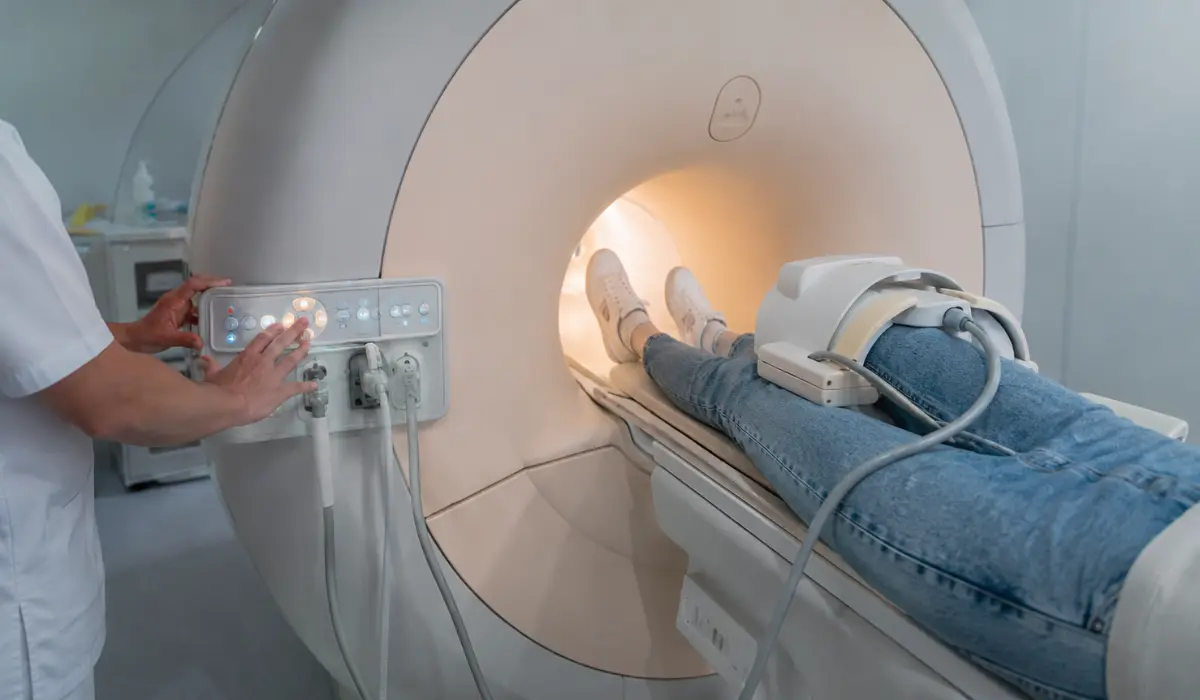
During the scan, you lie on a padded table while your knee rests in a special support or coil. This helps the MRI focus on the knee and capture clear, detailed images safely.
The technician checks your leg position before moving the table into the scanner. Depending on the machine and setup, your whole body may not need to go inside the MRI opening fully during scanning.
The machine may make loud tapping or humming sounds, which is normal. Earplugs or headphones can reduce noise. The technician monitors you through an intercom, and you should stay still until the scan finishes completely.
If Contrast Dye Is Needed
Most knee MRIs are done without contrast dye. However, in some cases, your doctor may order a contrast MRI to get a clearer look at inflammation, infection, tumors, blood flow, or scar tissue after surgery. Contrast dye is usually given through a small IV line in your arm before or during the scan.
A knee MRI with contrast may take longer than a regular scan. The extra time is needed for IV placement, dye injection, and additional image sequences. In many cases, contrast can add around 10 to 20 minutes to the appointment. If you have kidney problems, allergies, or past reactions to contrast dye, tell the imaging staff before the procedure begins.
After The MRI Scan
After the knee MRI is finished, the technician will help you off the table, and you can usually leave right away. There is no recovery time for a regular MRI, so most people can return to normal daily activities immediately. If you received contrast dye, the staff may give you simple aftercare instructions, such as drinking water to help your body clear it naturally.
The MRI images are reviewed by a radiologist, who prepares a report for your doctor. Your doctor will then explain the results and discuss the next steps. A knee MRI can help identify problems such as meniscus tears, ACL or MCL injuries, cartilage loss, arthritis changes, tendon damage, swelling, or bone bruises. The results help guide treatment, therapy, or further testing if needed.
Tips To Make The MRI Easier
Wear loose, comfortable clothing without metal parts if the imaging center allows it. Arrive a little early so you have enough time for paperwork and screening. If you feel nervous in small spaces, tell the staff before the scan starts. They may offer breathing tips, extra support, music, or an open MRI option if available.
Try to stay relaxed and keep your leg still during the scan. Deep breathing can help reduce tension and make the time pass more easily. If your knee is painful, let the technician know before positioning begins. They may use cushions or supports to help you stay comfortable while still keeping the knee in the correct position for clear images.
Conclusion
So, how long does a knee MRI take? In most cases, the scan itself takes around 20 to 45 minutes. The full appointment usually takes about 30 to 60 minutes, depending on preparation, positioning, machine type, and whether contrast dye is used. Some detailed scans may take longer, especially if extra images are needed.
A knee MRI is painless, non-invasive, and very useful for finding the cause of knee pain, swelling, stiffness, or injury. Knowing what to expect can make the process less stressful. By arriving prepared, staying still, and following the technician’s instructions, you can help the scan finish smoothly and support more accurate results.
FAQS
Results are usually available within 24 to 72 hours, depending on the imaging center and radiologist’s schedule. Your doctor will review them with you.
Yes, using a contrast dye may add 10 to 15 minutes for injection and monitoring, but it helps highlight soft tissues and blood vessels.
Patients who feel anxious may require breaks or use an open MRI, which can take longer but provides a more comfortable experience.
The procedure is painless. Some patients may feel slight discomfort from lying still or having their knee positioned in the coil for a prolonged time.
Yes, moving during the scan can blur images and may require repeated sequences, increasing the total scan time.
Reference
RadiologyInfo.org – MRI of the Knee
https://www.radiologyinfo.org/en/info/kneemr
Useful for explaining how a knee MRI works, what to expect during the scan, and patient safety tips.
Mayo Clinic – MRI
https://www.mayoclinic.org/tests-procedures/mri/about/pac-20384768
Helpful for describing the procedure, duration, preparation, and how MRI images are used for diagnosis.
NHS – MRI Scan
https://www.nhs.uk/tests-and-treatments/mri-scan/
Provides patient guidance on what happens during a knee MRI, expected scan time, and aftercare instructions.
American College of Radiology – MR Safety Resources
https://www.acr.org/Clinical-Resources/Clinical-Tools-and-Reference/radiology-safety/mr-safety
Good source for understanding MRI safety, screening, and proper preparation to avoid complications.
Johns Hopkins Medicine – MRI Scan
https://www.hopkinsmedicine.org/health/treatment-tests-and-therapies/magnetic-resonance-imaging-mri
Useful for explaining the imaging process, scan duration, and what patients should do before and after the MRI.